

AD Forest Trust One Way and Two Way Trust
Active Directory (AD) trusts are a fundamental part of Microsoft Windows Server environments. They allow administrators to manage secure communication and resource sharing across different domains and forests. In today’s tutorial (Day 30 of our MCSA Full Course), we will focus on Forest Trusts and understand the difference between One-Way Trust and Two-Way Trust with real-world practical examples.
🔹 What is a Forest Trust?
A Forest Trust is a relationship between two different Active Directory forests. Each forest can contain multiple domains, but when you need cross-forest authentication and resource sharing, you must configure a Forest Trust.
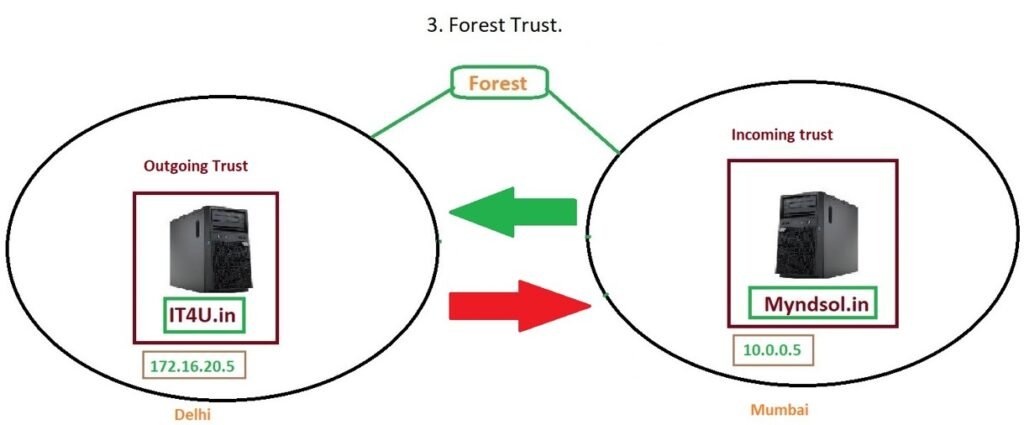
For example:
- You have a primary forest
it4u.in. - You create a separate forest
myndsol.in.
To enable users from one forest to access resources in the other, you configure a Forest Trust.
🔹 Types of Trust Relationships
When configuring trusts, you have two important categories:
- Transitive Trusts – Automatically extend to other domains within the forests.
- Non-Transitive Trusts – Restricted to the two domains/forests involved.
Within these, you can configure:
- One-Way Trust
- Two-Way Trust
🔹 One-Way Forest Trust
A One-Way Trust allows authentication in only one direction.
- If you configure One-Way Outgoing Trust on
it4u.in→ then users inmyndsol.incan access resources initford.in. - If you configure One-Way Incoming Trust on
it4u.in→ then users init4u.incan access resources inmyndsol.in.
👉 Use Case Example:
Imagine your company has two branches – Delhi (it4u.in) and Mumbai (myndsol.in). You may want users in Mumbai to access Delhi’s resources, but not vice versa. In this case, you configure a One-Way Outgoing Trust from Delhi to Mumbai.
🔹 Two-Way Forest Trust
A Two-Way Trust is reciprocal. Both forests trust each other, and users from either forest can access resources in the other.
👉 Use Case Example:
If your Delhi and Mumbai offices need to fully collaborate, you would configure a Two-Way Trust. Users in it4u.in can log in to myndsol.in systems and vice versa.
🔹 Practical Steps to Create a Forest Trust
- Prepare Forests – Ensure both forests (
itford.inandmindsol.in) have functioning domain controllers with DNS properly configured. - DNS Configuration – Add each other’s IP addresses in DNS forwarders to allow cross-forest name resolution.
- Create Trust via AD Domains and Trusts
- Open Active Directory Domains and Trusts.
- Right-click domain → Properties → Trusts → New Trust.
- Enter the target domain (
myndsol.in). - Choose Forest Trust.
- Select either One-Way (Incoming/Outgoing) or Two-Way depending on your requirement.
- Authentication Options – Choose Forest-wide authentication or selective authentication.
- Verify the Trust – Test logins from both sides to ensure the configuration works as expected.
🔹 Testing the Trust (Real Example)
- User “ac******@*****ol.in” was successfully able to log in on a machine joined to
it4u.inwhen a Two-Way Trust was configured. - Similarly, user “**@**4u.in” logged in on a machine joined to
myndsol.in. - When a One-Way Outgoing Trust was configured, only
myndsol.inusers could log in toit4u.in, but not the other way around.
This proves how One-Way and Two-Way trusts impact authentication and resource sharing.
🔹 Ports Required for AD Trust Communication
When forests are in different networks or locations, ensure the following ports are allowed in the firewall:
- TCP/UDP 53 – DNS
- TCP/UDP 88 – Kerberos Authentication
- TCP 389 – LDAP
- TCP 636 – Secure LDAP
- TCP 445 – SMB
- Dynamic RPC Ports (1024–65535, or restricted range)
🔹 Key Differences Between One-Way and Two-Way Trust
| Feature | One-Way Trust | Two-Way Trust |
|---|---|---|
| Direction | Single (Incoming or Outgoing) | Bidirectional |
| Authentication | Only one forest can authenticate into the other | Both forests can authenticate each other |
| Use Case | Limited collaboration or controlled access | Full collaboration between forests |
| Example | Mumbai office can use Delhi resources only | Delhi and Mumbai offices share all resources |
✅ Conclusion
Active Directory Forest Trusts are essential when managing multi-domain or multi-forest environments.
- One-Way Trust = Controlled, restricted access.
- Two-Way Trust = Full collaboration between forests.
By understanding and configuring these correctly, IT administrators can balance security with resource-sharing flexibility.
👉 Next Step: In the upcoming lessons, we’ll cover External Trusts and Shortcut Trusts in AD.
If you found this tutorial useful, don’t forget to:
- Subscribe to our channel for more free MCSA tutorials.
- Share your thoughts in the comments below.
- Stay tuned for Day-31 of our MCSA Full Course.
❓ Frequently Asked Questions (FAQ)
1. What is a Forest Trust in Active Directory?
A Forest Trust is a relationship between two Active Directory forests that allows users in one forest to access resources in another forest. It is commonly used in large enterprises with multiple domains and forests.
2. What is the difference between a One-Way and a Two-Way Trust?
- One-Way Trust: Only one forest can access the other’s resources.
- Two-Way Trust: Both forests trust each other, and users from both sides can access resources reciprocally.
3. When should I use a One-Way Forest Trust?
Use a One-Way Trust when you want controlled access — for example, if only users in Forest A should access resources in Forest B, but not the other way around.
4. When is a Two-Way Forest Trust required?
A Two-Way Trust is required when you want full collaboration between two forests, such as between different office locations or departments that share printers, file servers, and applications.
5. Do Forest Trusts support transitive relationships?
Yes. A Forest Trust can be transitive, meaning authentication requests can flow across all domains within both forests, provided permissions are configured correctly.
6. What ports need to be opened for AD Trusts to work?
The most important ports are:
- TCP/UDP 53 → DNS
- TCP/UDP 88 → Kerberos
- TCP 389 → LDAP
- TCP 445 → SMB
- TCP 636 → Secure LDAP
- RPC dynamic ports (1024–65535 or restricted range)
7. Can I configure Forest Trusts between different versions of Windows Server?
Yes, you can create trusts between forests running different versions of Windows Server, but the functional forest/domain level must support the trust type you want to create.
8. How do I verify if a Trust is working correctly?
After creating the trust, use the Validate button in the Trusts tab (within Active Directory Domains and Trusts). Additionally, try logging in with a user account from the trusted forest to confirm access.
9. What is the difference between Forest Trust and External Trust?
- Forest Trust: Connects two entire forests.
- External Trust: Connects two individual domains from different forests or a non-AD domain.
10. Is a VPN or firewall configuration required for cross-location Forest Trusts?
Yes. If the forests are in different geographical locations, you must configure proper VPN tunnels or firewall rules to allow AD-related ports to communicate securely between the forests.







Add comment