

Today, we will talk about the next topic in our MCSA course, which is IP addresses. An IP address is a unique identifier, meaning that any device you connect to the internet is identified uniquely.
IP (Internet Protocol) addressing is the cornerstone of digital communication in modern networking. Every device connected to a network, be it the internet or a local network, needs a unique identifier to communicate efficiently. The IP address serves as this identifier, allowing devices to locate and interact with each other seamlessly.
What is an IP Address?
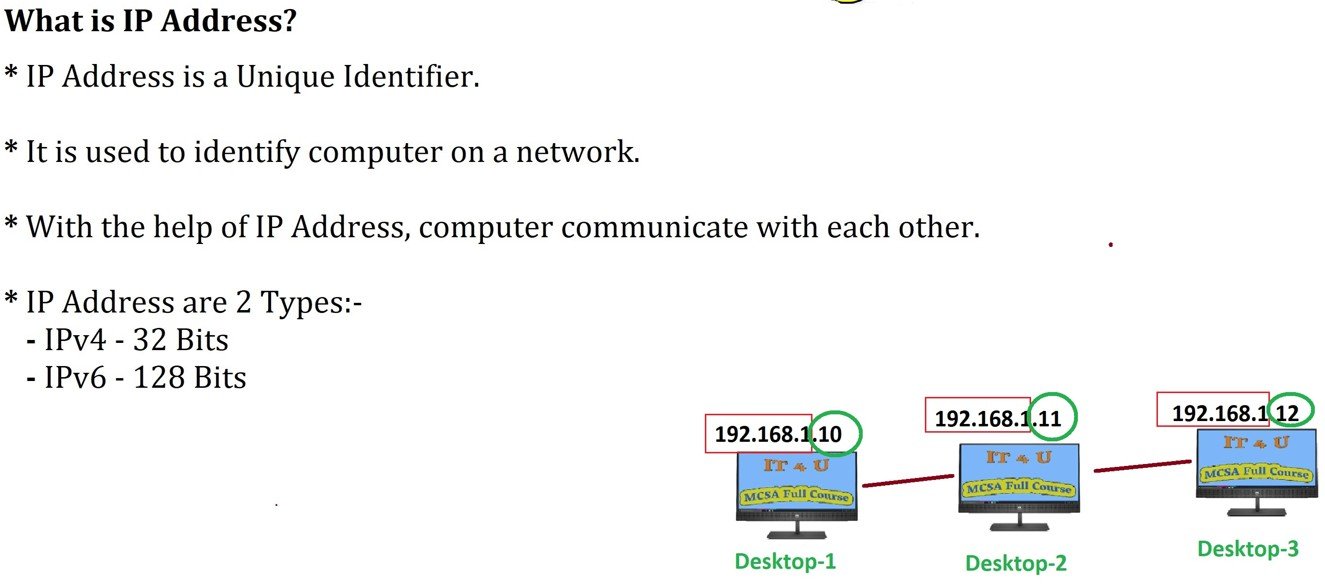
An IP address is a unique string of numbers and/or letters that identifies a device on a network. It’s essentially the digital equivalent of a postal address. Just as a physical address helps to deliver letters to the correct location, an IP address ensures that data packets reach their intended destination across a network. There are two primary versions of IP addresses in use: IPv4 and IPv6.
Decimal and Hexadecimal Formats
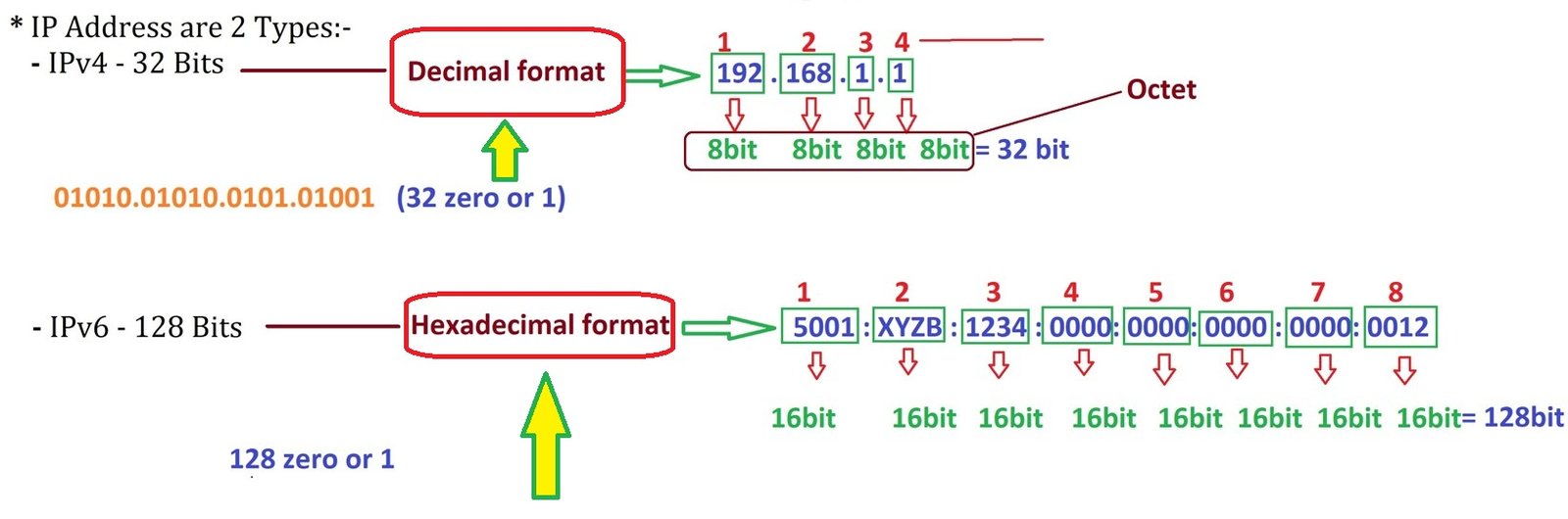
IP addresses are often represented in two common number systems: Decimal and Hexadecimal.
- Decimal Format: This is the most familiar number system to most people. It is based on the number 10 (from 0 to 9), which is what we use in everyday life. Each number in an IPv4 address is represented in decimal format (e.g., 192.168.1.1).
- Hexadecimal Format: This system uses the base 16 number system, including digits 0-9 and letters A-F (representing 10 to 15). Hexadecimal is more compact and is often used to represent IPv6 addresses. It’s especially useful in computing for simplifying long binary numbers. An IPv6 address is written as eight groups of four hexadecimal digits (e.g., 2001:0db8:85a3:0000:0000:8a2e:0370:7334).
These formats are crucial because they represent how IP addresses are stored and processed by machines. While humans generally prefer decimal because it’s easier to read, hexadecimal is often used in networking because it allows a more concise representation of larger binary numbers.
IPv4 and IPv6
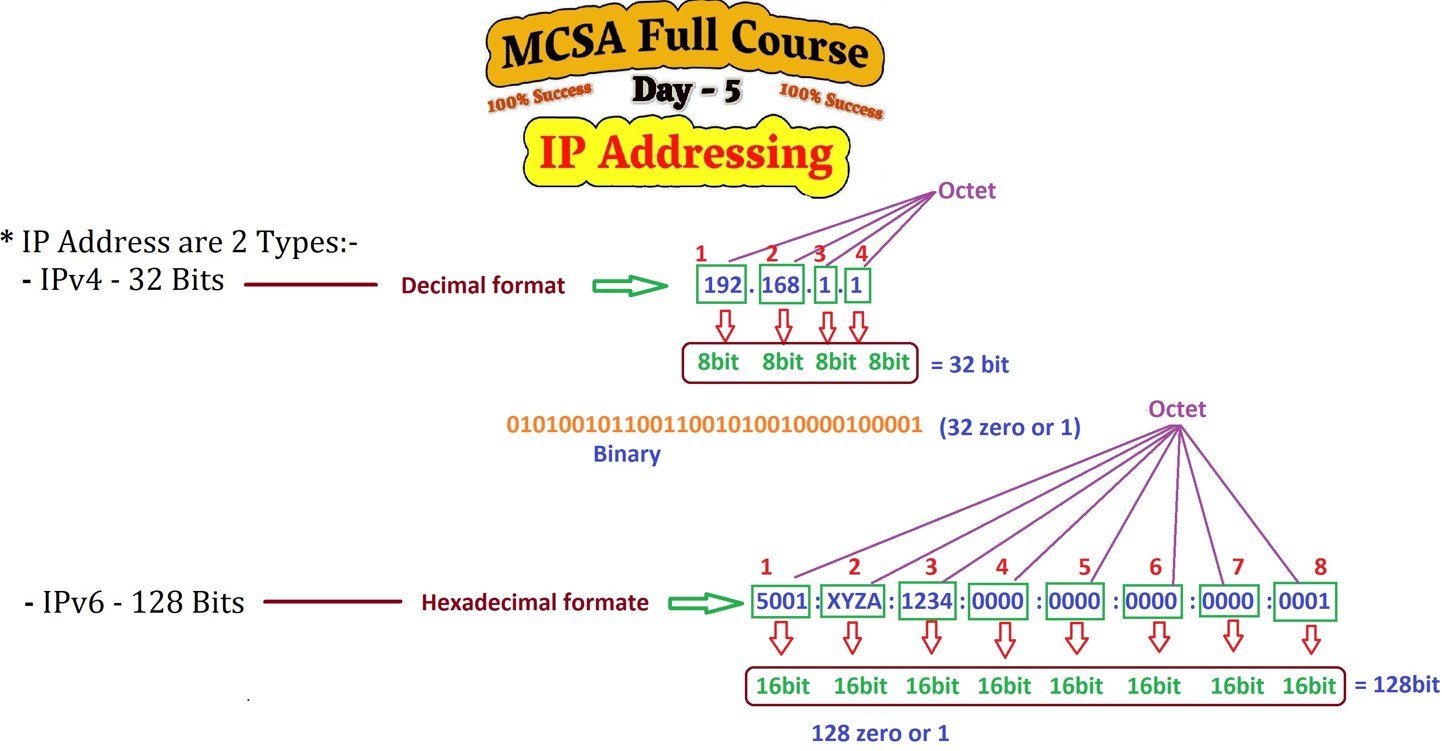
IPv4: The Classic Version
IPv4 (Internet Protocol version 4) is the most commonly used version of the Internet Protocol. It uses a 32-bit address scheme, which allows for approximately 4.3 billion unique addresses. An IPv4 address is typically written as four decimal numbers separated by periods (e.g., 192.168.1.1), where each number represents an 8-bit octet.
However, with the exponential growth of internet-connected devices, the available IPv4 addresses have become scarce, necessitating the need for IPv6.
IPv6: The Future of IP Addressing
IPv6 (Internet Protocol version 6) was introduced to solve the problem of IPv4 address exhaustion. IPv6 uses a 128-bit address scheme, offering a virtually unlimited number of unique addresses—roughly 340 undecillion (3.4×10^38) addresses. This vast pool ensures that we will not run out of addresses anytime soon.
An IPv6 address is written as eight groups of four hexadecimal digits, separated by colons (e.g., 2001:0db8:85a3:0000:0000:8a2e:0370:7334).
Who handles IP Address
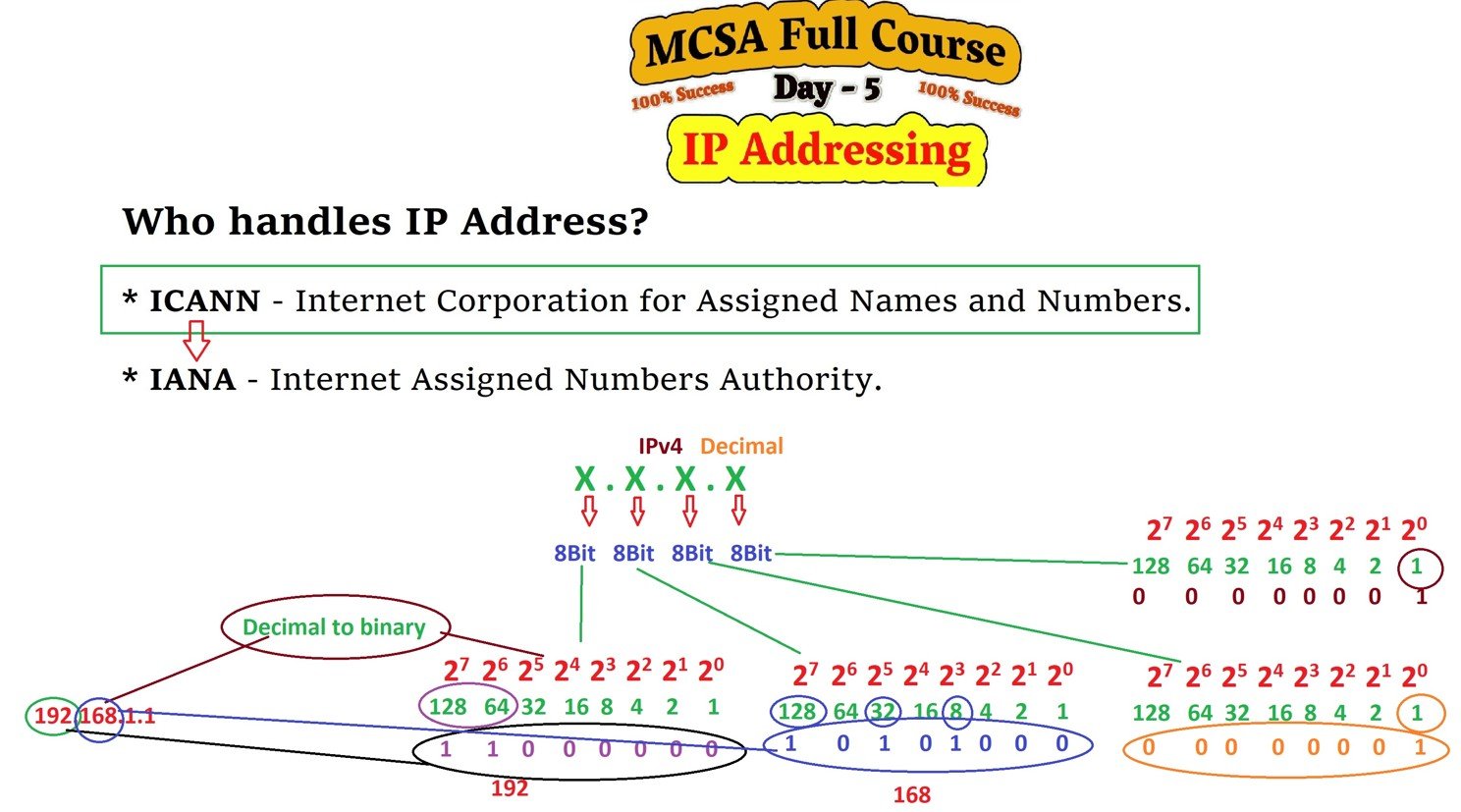
IP Address Classes
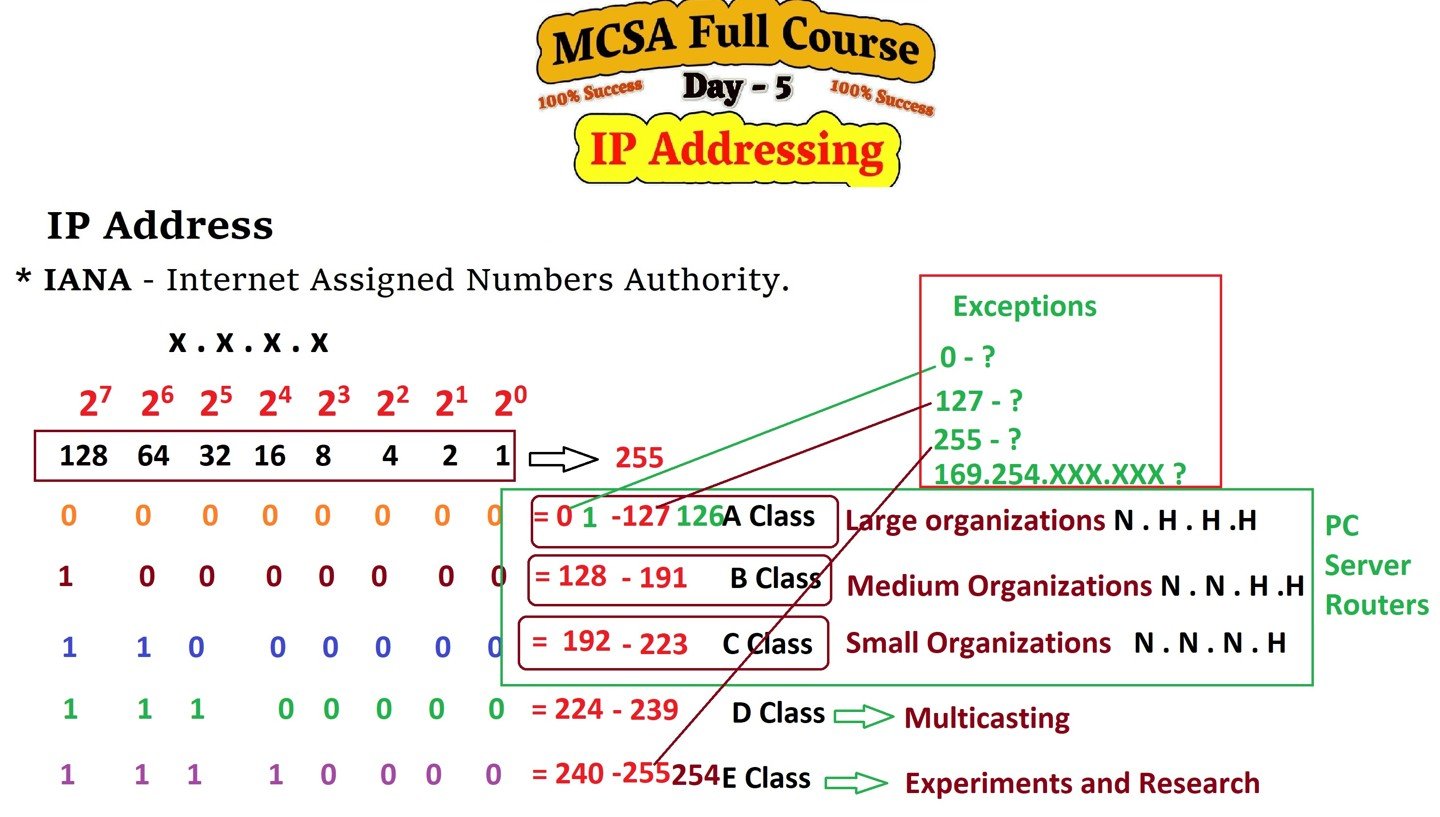
IP addresses are also divided into classes based on their range and intended use. These classes help determine the number of devices a network can support and the address allocation. The five primary classes are:
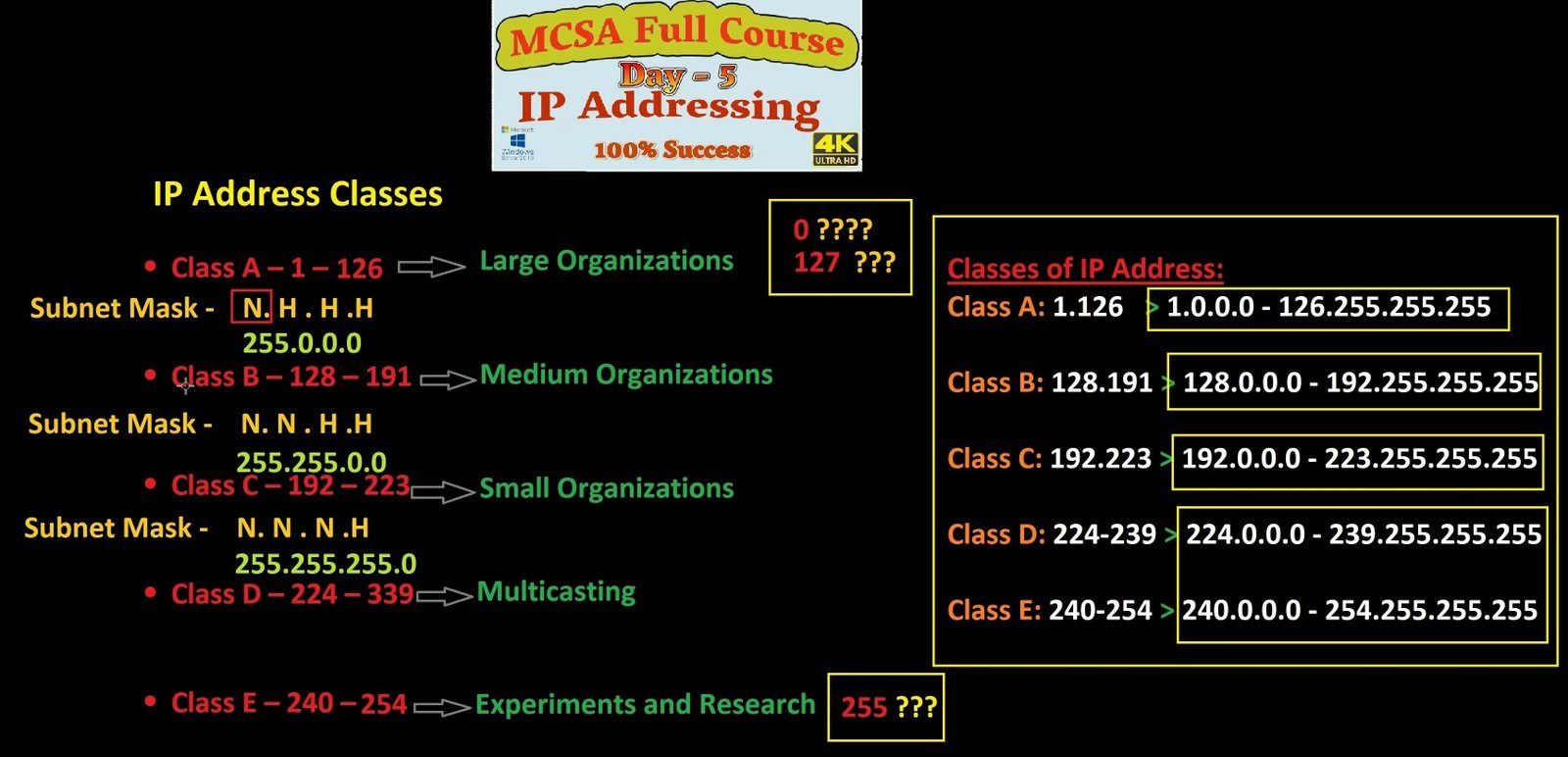
- Class A: Designed for large networks, Class A supports a range of 1.0.0.0 to 127.255.255.255.
- Class B: Suitable for medium-sized networks, it supports a range of 128.0.0.0 to 191.255.255.255.
- Class C: Ideal for small networks, Class C supports a range of 192.0.0.0 to 223.255.255.255.
- Class D (Multicast): Used for group communication rather than device communication, with an address range of 224.0.0.0 to 239.255.255.255.
- Class E (Reserved): Reserved for future use, with an address range of 240.0.0.0 to 255.255.255.255.
Understanding Network Address Translation (NAT)
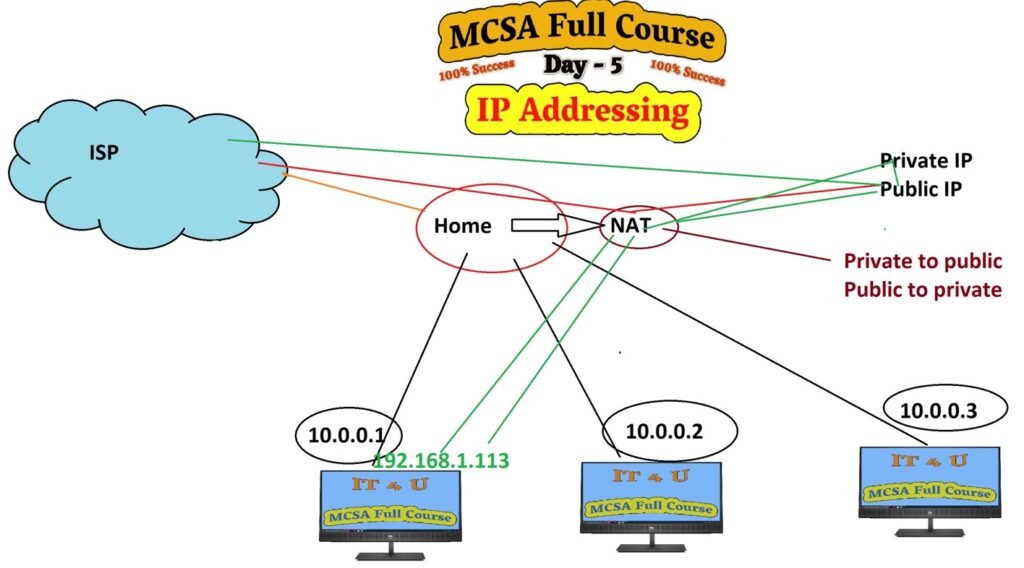
NAT is a process used in networks to allow multiple devices on a local network to share a single public IP address. It acts as a bridge between a private network and the public internet, making it possible for devices with private IPs to communicate with the outside world using a single public IP.
NAT plays a crucial role in conserving IP addresses and ensuring security by hiding internal network structures from external sources.
What is Public and Private IP Address?
IP addresses can be categorized into different types based on their usage. Here are the key types:
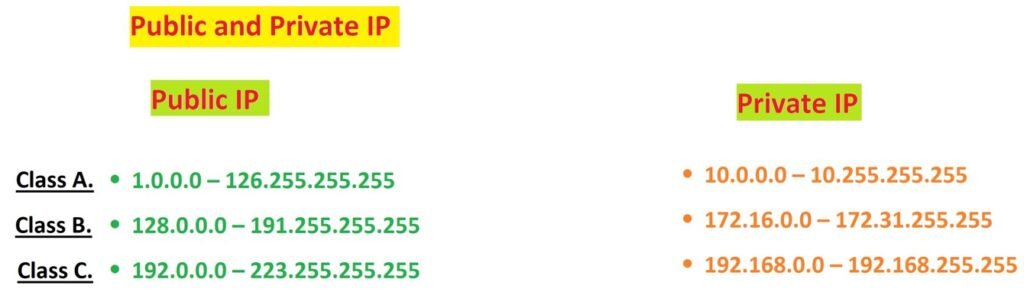
- Public IP Address: This is the unique address assigned to a device directly connected to the internet. Public IP addresses are globally routable and can be used for communication across the internet.
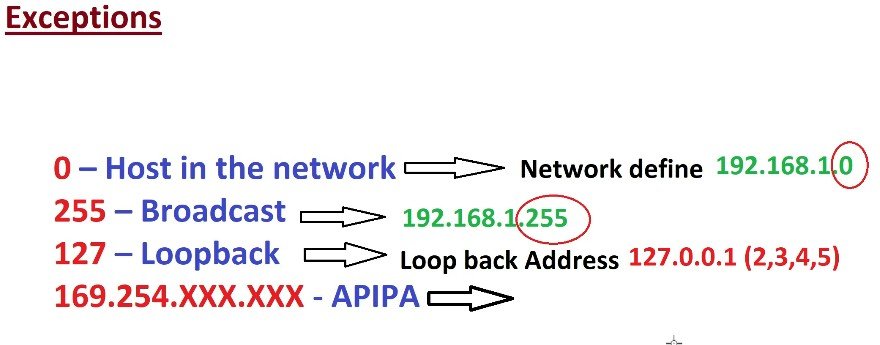
- Private IP Address: These addresses are used within private networks, like home or corporate networks. Private IP addresses are not routable on the internet. Common private IP address ranges include:
- 10.0.0.0 – 10.255.255.255
- 172.16.0.0 – 172.31.255.255
- 192.168.0.0 – 192.168.255.255
Static IP Address: A static IP address does not change. It is manually configured and remains the same every time a device connects to the network.
Dynamic IP Address: Dynamic IP addresses are assigned by a DHCP (Dynamic Host Configuration Protocol) server. These addresses can change each time a device connects to the network.
How Public and Private IPs Work:

The Role of Subnetting
Subnetting is a technique used to divide a larger network into smaller, manageable sub-networks. It improves network performance and security by limiting broadcast traffic and organizing networks more efficiently. Subnetting is particularly important in IPv4 networks due to the limited number of available addresses.
Conclusion
Understanding IP addressing is crucial for anyone involved in networking, whether you’re an IT professional or a casual internet user. As we move further into the digital age, the demand for more efficient, secure, and scalable IP addressing schemes continues to grow. With the transition from IPv4 to IPv6 underway, the future of IP addressing promises to support the ever-expanding universe of connected devices.
By grasping the fundamentals of IP addressing, you’ll not only better understand how the internet and local networks function but also gain a solid foundation for diving deeper into more advanced networking topics.
There are many more aspects of IP addressing that need to be understood, from subnetting and NAT to the role of IP in network security. To stay updated with the latest insights and detailed explanations, make sure to follow my channel and visit this website for more information on mastering IP addressing.
For a detailed, step-by-step guide, check out my video where I explain each step in detail. If you’re still facing any issues, feel free to leave a comment below, and I’ll be happy to help you resolve them.
If you found this blog helpful, don’t forget to comment below, and like and share the video. Subscribe to the channel to stay updated with all upcoming tutorials. Your journey to mastering MCSA and virtualization starts here, and I’ll guide you every step of the way.
Stay tuned for the next post, where we will dive deeper into Day-6 Microsoft Active Directory.






I really enjoyed Sir. You explained such a technical topic in a very simple and easy-to-understand way. The examples you included made it much clearer how IP addresses work in real-life situations. This post was very informative and definitely helped me strengthen my basics. Great work—looking forward to more posts like this! Thank you so much Sir, you’re great 🙏🏼
Thank you so much for your kind words 🙏. I’m really glad the explanation and examples helped make the topic clear for you. Your support motivates me to create more posts like this. Stay tuned—more tutorials are on the way!